

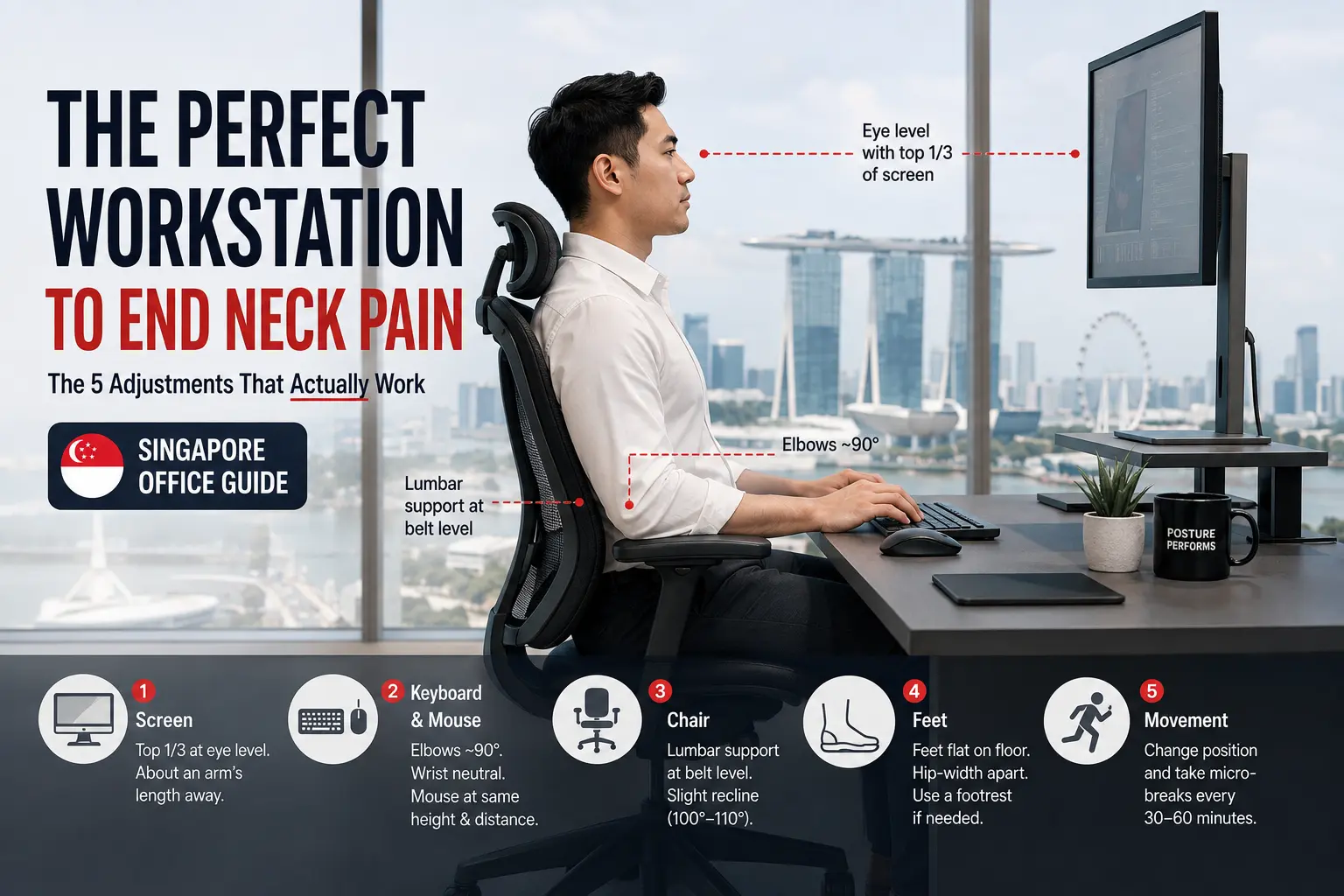
In a Singapore General Hospital study of 324 office-worker respondents, 73% reported pain in at least one body area, and 46% reported neck pain (the most common location). Yet many professionals have already spent thousands on ergonomic chairs and standing desks. So why does it still hurt?
Because a S$1,500 chair does little if you are still leaning toward a 13-inch laptop. This is the definitive, numbers-based guide to setting up your workstation in Singapore, surviving hot-desking in the CBD, and knowing when the problem is no longer your desk, but your spine.
Key takeaways
- Neck pain is common here. In an SGH study of 324 office-worker respondents, 73% reported pain in at least one area and 46% reported neck pain. This is one 324-person sample, not a national prevalence estimate.
- Forward head posture loads the neck. A widely cited biomechanical model estimated cervical loading rising from about 10 to 12 lb (4.5 to 5 kg) in neutral to roughly 60 lb (27 kg) at 60 degrees of forward flexion. These are modelled estimates, not a simple "10 lb per inch" rule.
- Adjust everything together. Monitor height, viewing distance, chair support, keyboard position, and movement breaks all work as one system.
- Standing is not a cure. A height-adjustable desk helps you break up sitting; it does not automatically fix neck posture, and standing badly just shifts the strain.
- Ergonomics is preventative, not corrective. If your setup is perfect but your neck still burns by 3pm, your cervical curve may have already flattened, which a chair cannot reverse.
The Physics of Tech Neck: Why Chairs Alone Fail You
To set up your desk well, it helps to understand why you hurt. The human head weighs roughly 10 to 12 pounds (about 4.5 to 5 kg), about the weight of a bowling ball. When your spine holds its natural C-curve, your skeleton supports that weight with little effort. When you lean toward a screen, your head drifts forward and the muscles at the back of your neck have to work far harder to hold it up.
How much harder? A widely cited 2014 biomechanical model by Hansraj estimated the load on the cervical spine at different head angles. The key point: these are modelled estimates from a computer simulation, not direct measurements, and the model became unreliable beyond 60 degrees. Still, the trend is striking. It does not mean every inch of forward posture adds a fixed amount, and it does not prove that any single posture will cause injury.
| Head position | Modelled cervical load |
|---|---|
| Neutral (looking ahead) | About 10 to 12 lb (4.5 to 5 kg) |
| 15 degrees forward | About 27 lb (12.3 kg) |
| 30 degrees forward | About 40 lb (18.2 kg) |
| 45 degrees forward | About 49 lb (22.3 kg) |
| 60 degrees forward | About 60 lb (27.3 kg) |
Modelled biomechanical estimates from Hansraj (2014), not direct measurements or an injury threshold. They illustrate a trend, not a per-inch rule, and the model was unreliable past 60 degrees.
Over months and years, holding a static forward posture encourages what is often called ligament creep: the gradual lengthening of the posterior neck ligaments under sustained load. As the supporting tissues stretch and the cervical curve flattens, the muscles end up working overtime just to keep your head upright. That is the mechanism behind chronic forward head posture and the tension headaches that come with it.
The 5-Point Perfect Workstation (Sitting)
Do not guess. Use these five checkpoints to bring your body into a supported, neutral position, then remember that the goal is not to freeze in one "perfect" pose but to stay supported while you move regularly.
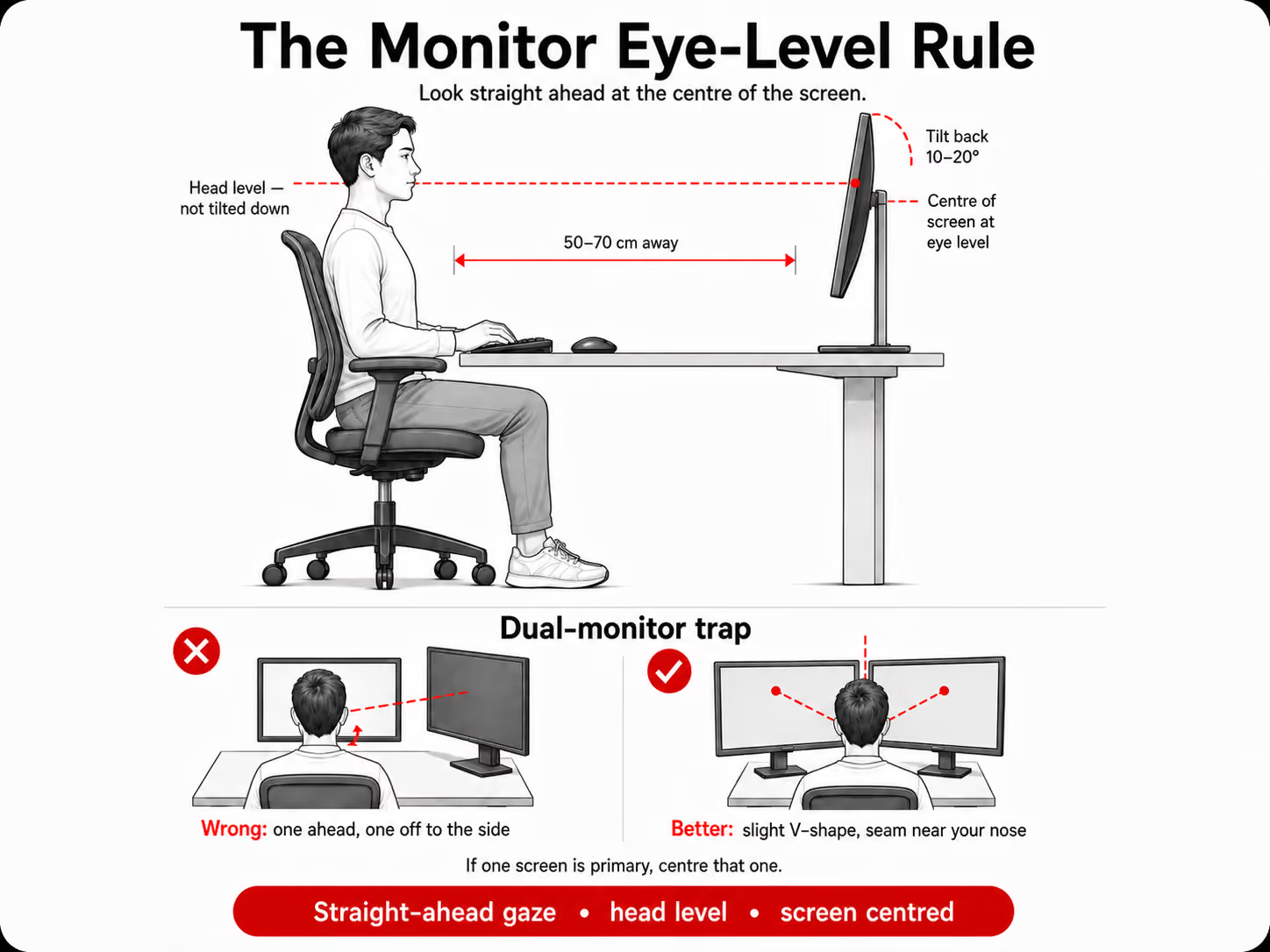
1. The monitor (eye-level rule)
Position the monitor so you look straight ahead at the centre of the screen with your head level, not tilted down. The centre of the screen should sit at about eye level, because tilting the chin down to a low screen is the main driver of desk-related neck strain. Keep it an arm's length away (roughly 50 to 70 cm) and tilt it back about 10 to 20 degrees.
The dual-monitor trap: if you use two screens equally, don't put one straight ahead and one off to the side, that breeds one-sided neck rotation strain. Place them in a slight V-shape in front of you with the seam near your nose. If one screen is primary, centre that one.
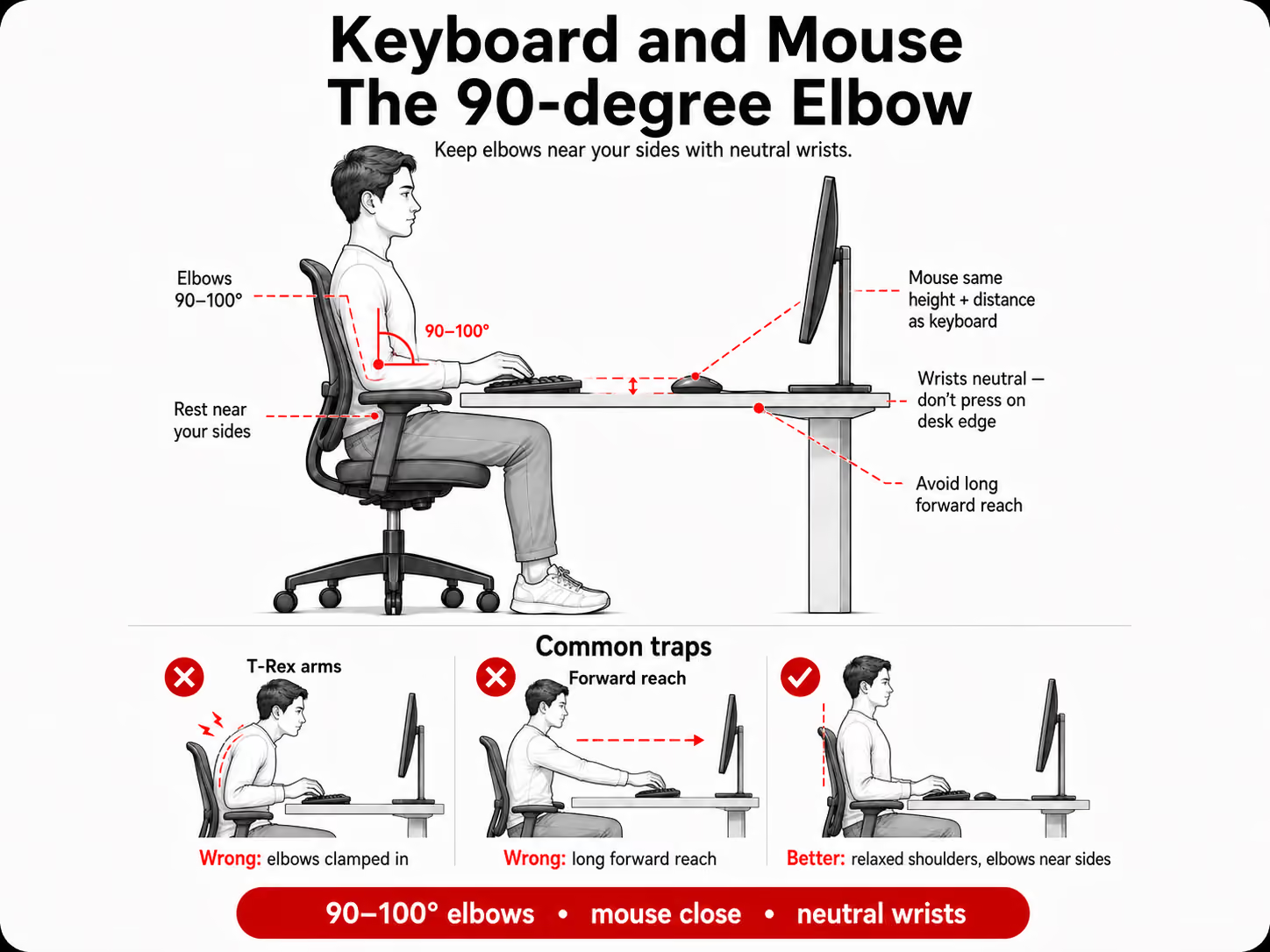
2. Keyboard and mouse (the 90-degree elbow)
Your elbows should sit at about 90 to 100 degrees, resting near your sides. Avoid "T-Rex arms" (elbows clamped in) and long forward reaches, both quickly trigger upper-trapezius tension. Keep the mouse at the same height and distance as the keyboard, and let your wrists float in neutral rather than resting hard on the desk edge while typing.
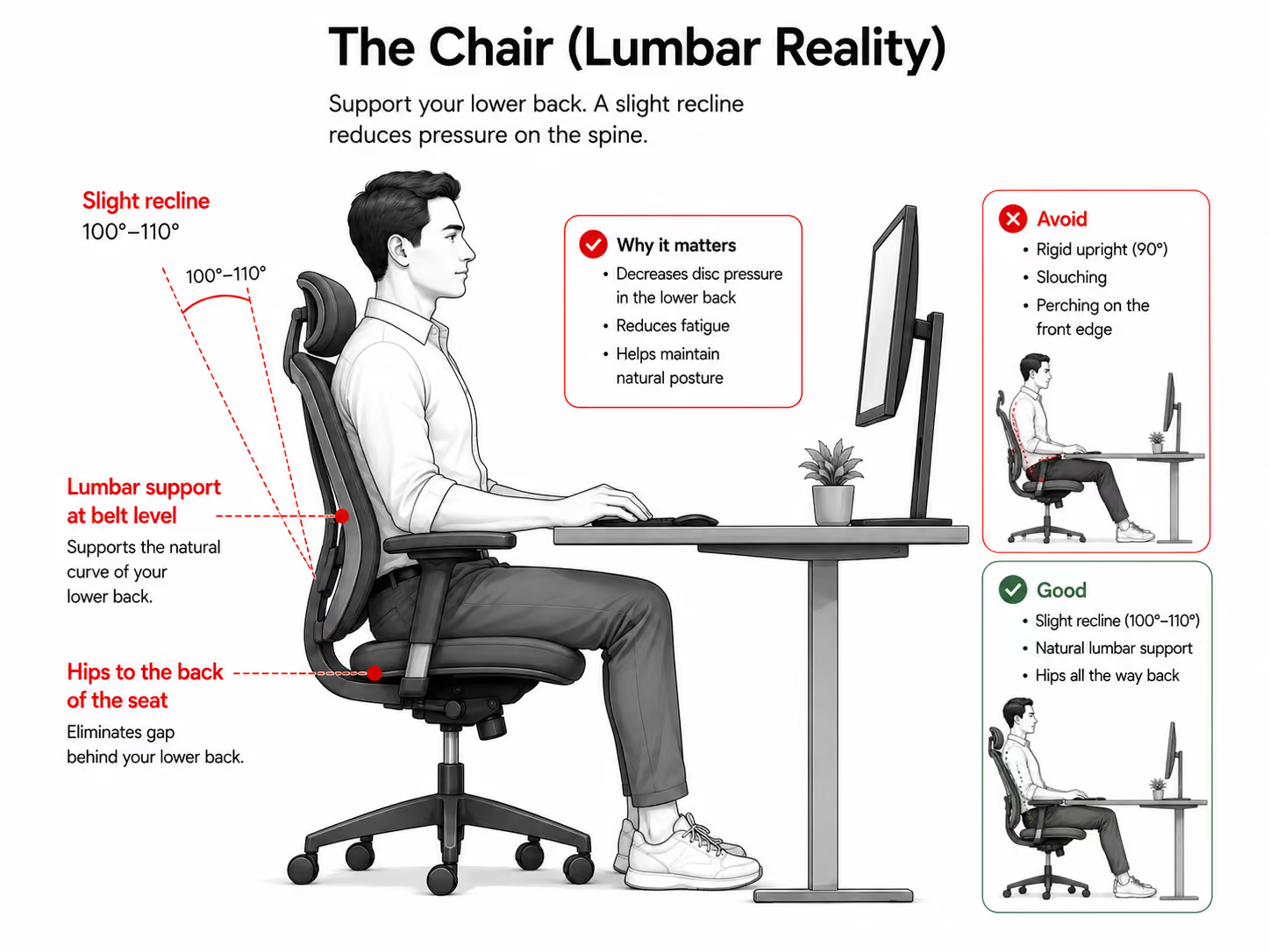
3. The chair (lumbar reality)
Push your hips to the back of the seat so the backrest and any lumbar support meet the natural curve of your lower back (roughly belt level). A slight recline (100 to 110 degrees) takes pressure off the lumbar discs compared with a rigid upright. A premium chair helps, but only if the screen and desk are set correctly too.
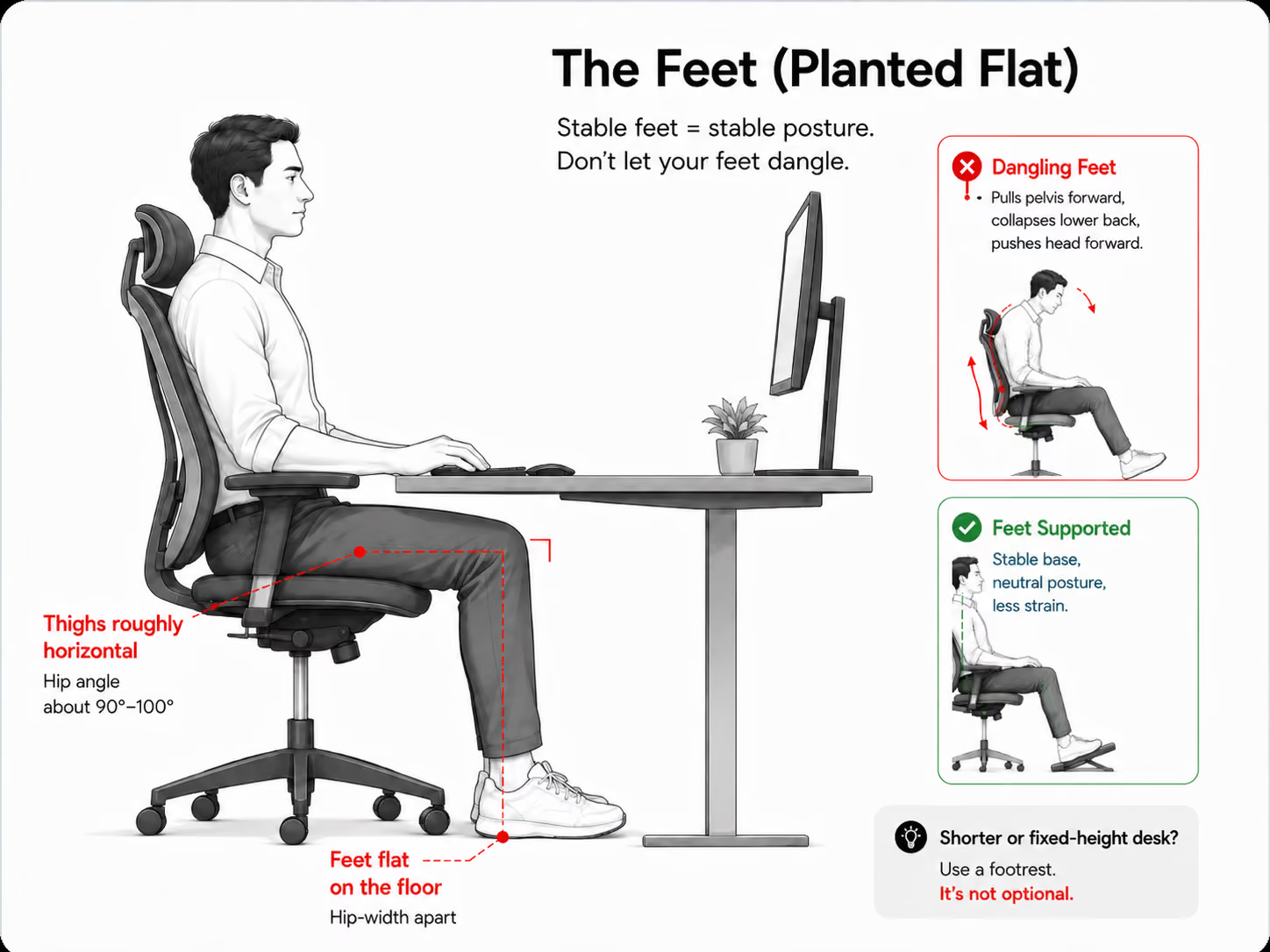
4. The feet (planted flat)
Feet flat on the floor, hip-width apart, thighs roughly horizontal. Dangling feet pull the pelvis forward, which collapses the lower back, which pushes the head forward to compensate. If you are shorter or your desk is fixed-height, a footrest is not optional.
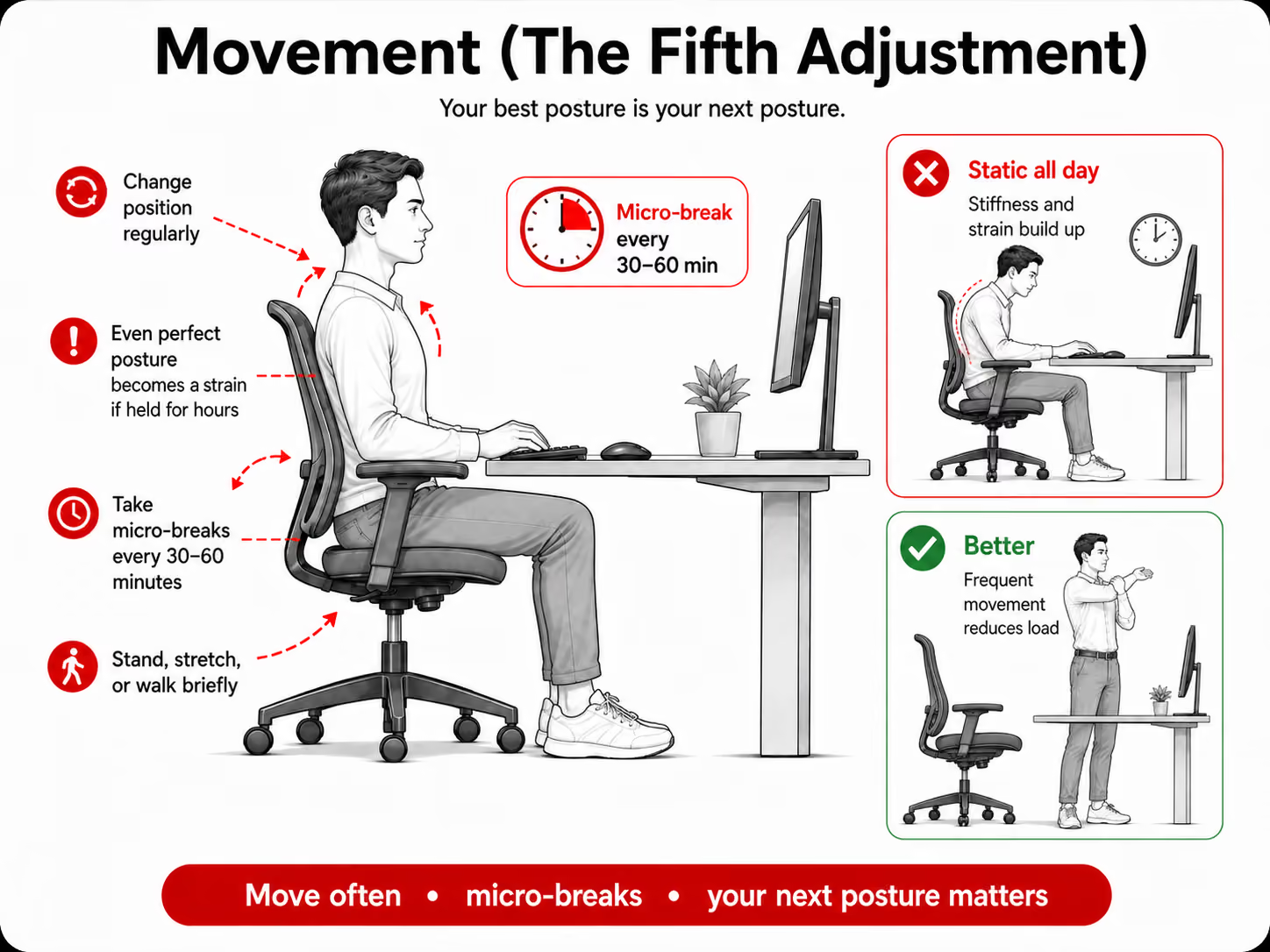
5. Movement (the fifth adjustment)
No static setup is complete without movement. Even a perfect posture held for hours becomes a strain. Change position and take micro-breaks every 30 to 60 minutes (more on the protocol below). As the saying goes, your best posture is your next posture.
The "By-The-Numbers" Height Cheat Sheet
Stop guessing with adjustable desks. Use these as starting points, then fine-tune for your footwear, torso length, and the five checkpoints above.
| Your height | Seated desk height | Standing desk height |
|---|---|---|
| 152 cm (5'0") | 61 to 63 cm | 96 to 99 cm |
| 162 cm (5'4") | 64 to 66 cm | 99 to 102 cm |
| 167 cm (5'6") | 66 to 69 cm | 102 to 104 cm |
| 178 cm (5'10") | 69 to 71 cm | 107 to 109 cm |
| 183 cm (6'0") | 71 to 74 cm | 112 to 114 cm |
General starting points only. Adjust to your own build, and always let the elbow and eye-level rules override the table.
How to Set Up a Standing Desk Properly
The biggest ergonomic myth in Singapore is that an Omnidesk or EverDesk alone will fix your spine. A height-adjustable desk is a movement option, not a posture cure. Standing with a forward head just moves the strain around, so set it up deliberately.
- Set elbow height firstRaise the desk until your forearms rest flat with elbows at 90 to 100 degrees and your shoulders drop naturally, without hunching up.
- Then set the monitorSame rule as sitting: the centre of the screen at eye level so you look straight ahead, an arm's length away, tilted back 10 to 20 degrees.
- Stand wellHead, shoulders, hips, and ankles stacked; core gently engaged; knees soft, never locked; weight even. Use an anti-fatigue mat and supportive shoes.
- Follow a sit-stand ratioDon't stand all day. Aim to stand roughly 15 to 30 minutes for every hour of sitting, and sit down the moment you feel back or leg fatigue.
Reality check
Standing continuously is not automatically better than sitting, and a poorly set standing desk still encourages raised shoulders, bent wrists, or a forward head. The benefit comes from alternating and moving, not from standing itself.
The Laptop & Hybrid Work Survival Guide
The most damaging ergonomic trend in Singapore is hot-desking in Raffles Place or working from a cafe on a bare 13-inch laptop. It is biomechanically impossible to hold good posture with a laptop flat on a desk: the screen forces your neck down toward your hands.
The mandatory hybrid kit
If you work on a laptop for more than about 45 minutes a day, carry these three items:
- A portable laptop standTo lift the screen 6 to 8 inches toward eye level.
- A wireless keyboardSo your hands stay low on the desk while the screen is raised.
- A wireless mouseTo avoid the trackpad reach that strains the shoulder.
For a quick CBD hot-desk reset in 30 seconds: set the chair height first (feet flat, elbows at 90 degrees), then raise the monitor arm so the screen centre sits at eye level. Two adjustments, in that order, fix most shared desks.
The Movement Protocol: Your Best Posture Is Your Next One
Your body is not built to hold any single position for eight hours. Two simple rhythms do most of the work.
The 20-20-20 rule protects your eyes and your upper neck: every 20 minutes, look at something at least 20 feet away for 20 seconds. This resets your focal point and lets the suboccipital muscles at the base of the skull (a common source of tension headaches) relax.
The 20-8-2 rhythm keeps you moving through each half hour: roughly 20 minutes seated, 8 minutes standing, 2 minutes moving. Stand, stretch, or take a walking meeting.
Sneaky desk resets (no standing up)
- Chin tucks: draw your chin straight back (make a double chin) and hold 5 seconds. Repeat a few times to unload the back of the neck.
- Scapular squeezes: gently pinch your shoulder blades together for 10 seconds to wake up the postural muscles.
- Shoulder rolls: slow backward rolls, then let the shoulders settle down and back rather than forcing them.
Diagnostic: Is It Your Desk, or Is It Your Spine?
Here is what most furniture companies will not tell you: ergonomics is preventative, not corrective. If you buy a great chair after years of poor posture have flattened your cervical curve, the chair cannot push your bones back into place. Tick anything that sounds like you.
Self-check
The "structure vs setup" checklist
Tick any that apply. A result appears as soon as one is true.
Your result will show here.
Your desk may no longer be the problem.
If any of these sound familiar, your setup is likely doing its job, but your symptoms are pointing past ergonomics. When pain persists despite a good workstation, the cervical structure itself may have adapted, for example a flattened C-curve (hypolordosis) or a developing neck hump. You cannot "sit" your way out of a misaligned spine.
The way to know is not another chair. It is an objective, X-ray-guided structural assessment that measures your actual cervical curve.
Educational self-check only, not a diagnosis. If you have arm numbness, weakness, or sudden severe headaches, seek urgent medical care.
Frequently Asked Questions
What can I do to prevent neck pain when sitting at a desk?
Set your monitor so you look straight ahead at its centre with your head level, keep your elbows near 90 degrees, support your lower back, plant your feet flat, and move every 30 to 60 minutes. The single biggest fix is monitor height: raising the screen so you are not tilting your chin down is what takes the load off your neck. Everything else supports that neutral position, and regular movement keeps any one posture from becoming a strain.
What is the 90-90-90 rule in ergonomics?
It describes three right angles for seated posture: your elbows, hips, and knees each at roughly 90 degrees. Feet are flat on the floor (or a footrest), thighs about horizontal, and forearms level with the desk. It is a useful baseline, not a pose to hold rigidly, so still change position and take breaks.
Is a standing desk good for neck pain?
Mainly as a way to break up prolonged sitting, not as a fix for neck posture. A standing desk can reduce time spent static and ease lower-back load, but if your monitor is not raised to eye level you will still poke your head forward and strain your neck. Alternate sitting and standing, and set the screen height in both positions.
What is the 20-8-2 rule for ergonomics?
It is a movement rhythm for each half hour: about 20 minutes sitting, 8 minutes standing, and 2 minutes moving. The point is not the exact numbers but the habit of interrupting static posture regularly. It pairs well with the 20-20-20 eye rule (every 20 minutes, look 20 feet away for 20 seconds).
Why does my neck hurt when I sit in my office chair?
Usually because your head drifts forward to see the screen, so your neck muscles hold a heavier effective load for hours. A low monitor, a laptop, dangling feet, or an unsupported lower back all push the head forward. If the pain persists after you fix those, the cause may be structural rather than positional. See more on neck and shoulder pain.
Can an ergonomic chair fix my neck hump?
No. A dowager's hump is a structural adaptation, not a soft-tissue issue a chair can correct. The body lays down connective tissue to stabilise a collapsed lower cervical spine, so you cannot sit or massage a bone-and-posture change away. It needs physical structural correction, though good ergonomics still helps prevent it worsening.
Should I use a neck pillow or cervical roll on my office chair?
Only if it supports your natural neck curve without pushing your head forward. Many thick pillows shove the head away from the backrest and worsen forward head posture. Your head should rest roughly over your shoulders, so a small roll that fills the gap behind the neck is better than a bulky cushion that juts the chin forward.
When Ergonomics Fails, Check Your Alignment
Ergonomics is essential for preventing damage, but it cannot reverse structural collapse. You cannot sit up straight to fix a misaligned spinal bone. If you have perfected your workstation and the chronic pain, stiffness, and headaches remain, the issue has likely moved from your setup to your structure, and that deserves an objective look.
Stop blaming your chair.
If your workstation is dialled in but the pain, stiffness, and headaches persist, your cervical curve may have flattened. Find out with an X-ray-guided assessment whether the R3NEW X™ protocol can physically rebuild what years at a desk wore down.
Book your structural assessment on WhatsAppReferences
- Singapore General Hospital / SingHealth. Musculoskeletal Disorders and Office Ergonomics: study of 324 office-worker respondents (73% reported pain in at least one area; 46% neck). SingHealth
- Hansraj KK. Assessment of stresses in the cervical spine caused by posture and position of the head. Surg Technol Int. 2014 (biomechanical model). PubMed
Related reading
This article is educational information only and is not medical advice, diagnosis, or a treatment recommendation. The 73% figure comes from a single study of 324 office workers, and the head-load figures are modelled estimates, not direct measurements. Always consult a licensed healthcare professional for a diagnosis tailored to your condition. If you experience progressive weakness, numbness down the arms, or sudden severe headaches, seek urgent medical assessment.