

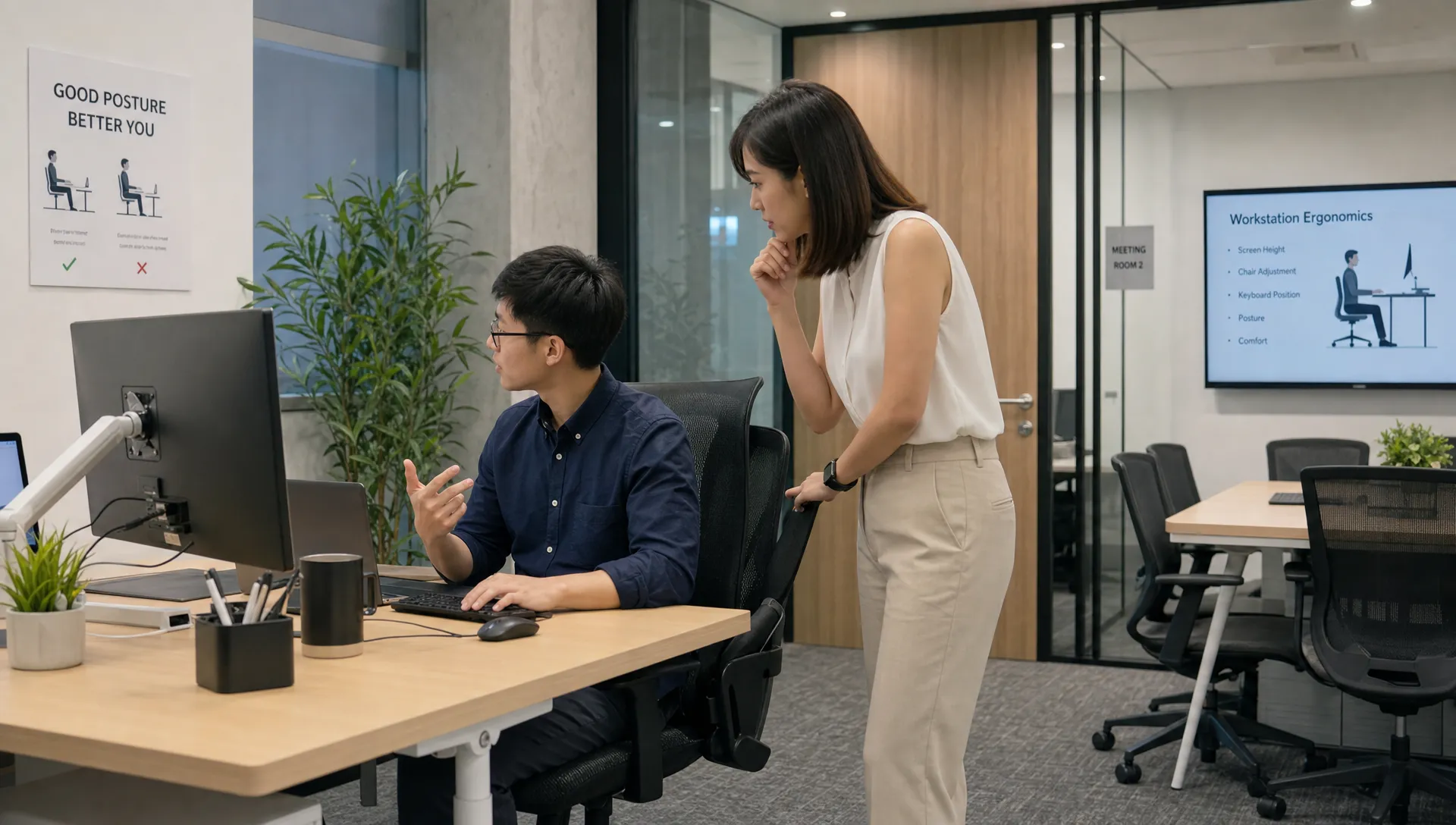
It is 4pm. There is a hot, heavy band of ache sitting across the tops of your shoulders and into the base of your neck, and it has been building since lunch. You have a good chair. You still feel it. Here is why, and what actually changes it.
This is not a general posture article. It is about the shoulder and upper-back load specifically, the upper trapezius, the mouse reach and the armrests, and the small calibration errors that keep your shoulders working when they should be resting.
The short version
- The 4pm shoulder ache is usually upper trapezius overload, a muscle held under low, constant load for hours, not a strain from any single effort.
- Two setup errors drive most of it: reaching for the mouse and badly set armrests. Both make your shoulders carry weight all day.
- Supporting the forearms correctly lowers upper-trap activity in EMG studies. Setting the armrest too high does the opposite, which is why height matters.
- Calibration removes the stressor. It does not repair alignment that has already changed, and that is the ceiling most premium setups quietly hit.
- If the ache travels into the arm, tingles or will not settle despite a clean setup, it is worth an assessment rather than another accessory.
Related reading
The 4pm Ache Across Your Shoulders
The sensation is specific: a burning, heavy tightness across the top of the shoulders and into the base of the neck, sometimes with a knot you can press between the shoulder blades. It is mild in the morning and loud by late afternoon. It eases overnight and returns the next workday. That daily rhythm is the signature of a muscle held under constant low-level load, not a muscle that was injured.
The muscle in question is usually the upper trapezius, with the levator scapulae close behind. Clinicians describe the wider pattern as upper crossed syndrome: the head drifts forward, the shoulders round, the chest and upper traps tighten while the deep neck and lower shoulder-blade muscles switch off. It is the default shape of desk work, and it is why the ache shows up as neck and shoulder tension and stiffness across the upper back rather than sharp, localised pain.
Your upper traps are not failing under a heavy lift. They are failing under a light load that never switches off for eight hours.
Each arm is roughly 5 percent of your body weight. When your forearms are not properly supported, that weight hangs from the shoulder girdle, and the upper trapezius holds a quiet, continuous contraction to carry it. Low-grade static load like this is a recognised risk factor for neck and shoulder complaints, and it is far less obvious than lifting something heavy, which is exactly why it is missed.
In Singapore this is amplified by the way people actually work: hybrid weeks split between an office desk, a dining table and a cafe counter, compact home spaces that push people onto laptops, long screen hours and short breaks. Work-related musculoskeletal disorders of the upper limb are recognised as reportable occupational diseases here, so this is a workplace-health issue, not a personal weakness. The knot in your shoulder is a loading problem, and loading problems are fixable.
Why It Is Static Load, Not Effort
Most people assume muscle pain means the muscle worked hard. Desk shoulder pain is the opposite problem. The upper trapezius, levator scapulae and the muscles around the shoulder blade often never fully relax during computer work. They sit at a low level of contraction for hours, and it is the duration, not the intensity, that irritates them.
This matters because it changes the fix. You cannot stretch your way out of a loading problem that reloads the moment you go back to the keyboard. If the ache always returns a couple of hours into the next session, the issue is not flexibility. It is that your setup is asking your shoulders to hold weight they should not be holding, and the two biggest culprits are where your mouse sits and where your arms rest.
The Mouse Reach
Watch yourself use a mouse for a minute. If it sits several inches to the right of the keyboard, every time you reach for it your arm travels out and forward, the shoulder blade rotates forward, and the upper trapezius fires to lift and stabilise the arm. One reach is nothing. Hundreds of reaches an hour, for a full day, is a training programme for a tight, aching shoulder.
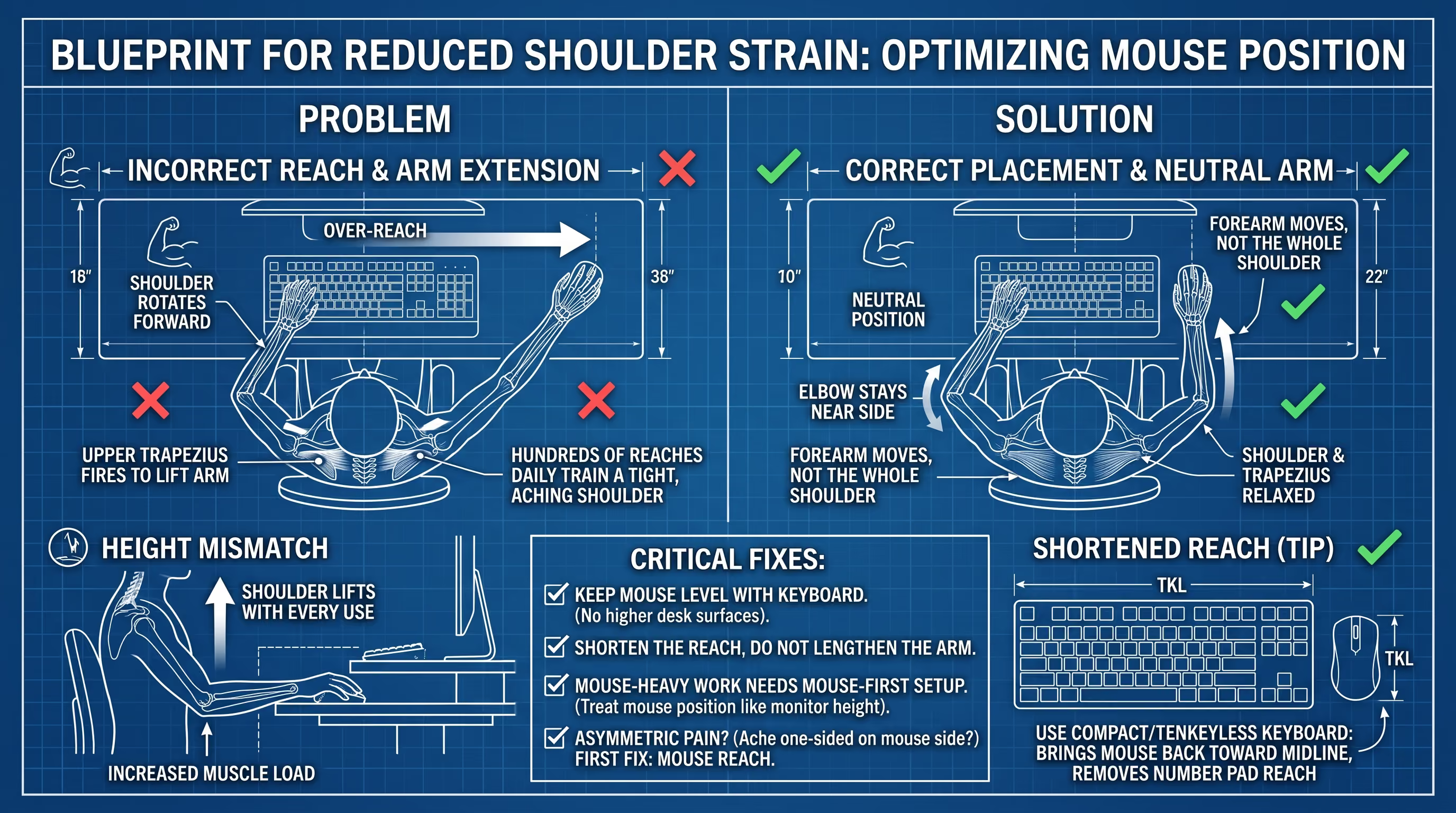
The fix is unglamorous and highly effective: bring the mouse right next to the keyboard, at the same height, so your elbow stays near your side. The forearm should move, not the whole shoulder. A few specifics that matter more than people expect:
- Keep the mouse level with the keyboardNot on a higher desk surface than the keyboard tray. A height mismatch means the shoulder lifts on every use.
- Shorten the reach, do not lengthen the armIf a full-size keyboard’s number pad pushes the mouse out to the right, a compact or tenkeyless keyboard brings the mouse back toward the midline.
- Mouse-heavy work deserves mouse-first setupIf you live in spreadsheets, CAD or design software, your hand is on the mouse more than the keys. Treat mouse position as seriously as monitor height.
If your ache is one-sided and it is the side of your mouse hand, the mouse reach is the first thing to fix. It is the single most common driver of asymmetric upper-trap and shoulder-blade pain in desk workers.
Armrest Height: The Overlooked Cause of Trap Spasm
Armrests look trivial. Biomechanically they are one of the most powerful levers you have over shoulder load, because they decide whether your arms are supported or suspended. Get them wrong and they do active harm.
Too high
- Shoulders sit slightly shrugged all day
- Upper traps and levator scapulae stay switched on
- Classic “raised trap” look and knots by afternoon
Too low or absent
- Arms hang, the shoulder girdle carries their weight
- Or you side-bend to reach the pad, loading one side
- Midday upper-back ache and asymmetry
The research fits this exactly. EMG studies generally show that properly supporting the forearms reduces upper trapezius and anterior deltoid activity during seated computer work, while support set too high, or wrist-only rests, can leave trap activity elevated or even raise it. In other words, a badly set armrest is not neutral. It is part of the problem. Here is the sequence that gets it right, and the order matters, because armrest height is defined by everything set before it.
- Set seat height firstFeet flat, thighs roughly horizontal, knees around 90 to 100 degrees. Everything else is measured from here.
- Set desk or keyboard heightForearms roughly parallel to the floor when typing, elbows around 90 to 100 degrees.
- Relax your shoulders completelyExhale, let the shoulder blades drop. Do not go hunting for the armrest by lifting your shoulders to meet it.
- Bring the armrest up to the elbow, no higherWith shoulders relaxed, raise the pads until they just lightly support the forearms. A practical target is level with, to about 2 cm below, your relaxed elbow, so they support without pushing up.
- Set the widthElbows should stay close to the torso, roughly 5 to 10 cm out, not flared wide, which pushes the shoulders into a rounded, protracted position.
- Match the armrest to the deskThe top of the armrest should sit within a few millimetres of the desk surface where your forearms rest, so support does not disappear the moment you move from keyboard to mouse.
The most common self-inflicted mistake
Raising the armrests to “feel more supported.” It feels reassuring for a minute, then it holds your shoulders shrugged for the rest of the day and makes the exact ache you are trying to fix worse. If you have a “raised trap” look by afternoon, lower them slightly.
The Rest of the Calibration, Fast
The mouse and the armrests are where the shoulder-specific wins are. The rest of the workstation still matters, but you do not need to relearn it here, our full desk and monitor setup guide has the complete walkthrough. The shoulder-relevant essentials are short:
- Chair before screen. If seat height is wrong, every other measurement is a compromise. Support the lower back so the ribcage stacks over the hips and gives the shoulders a stable base.
- Monitor so your eyes land about 2 to 3 inches below the top of the casing, roughly an arm’s length away, directly in front of you. A screen off to one side means repeated neck rotation on top of the shoulder load.
- Laptop users need external peripherals. Raising a laptop to save the neck, with no external keyboard and mouse, just moves the strain into the shoulders and wrists. Stand plus external keyboard and mouse, or nothing.

The 5-Minute Shoulder Calibration Check
Run this at the start of the day, after moving to a hot desk, or whenever you switch between office and home. It is built for real Singapore workspaces where not every desk adjusts.
Six checkpoints, each aimed at getting the shoulders to rest.
| Checkpoint | What to do | What you should feel |
|---|---|---|
| Feet and hips | Feet flat, thighs supported, hips level with or just above knees | No dangling feet, no bracing through the hips |
| Shoulders | Exhale and let the shoulder blades drop before you start | Shoulders low and heavy, not creeping toward the ears |
| Armrests | Support the forearm at, to just below, relaxed elbow height | Forearms carried, no shrug to reach the pad |
| Mouse | Right next to the keyboard, same height, elbow near your side | Forearm moves, shoulder stays still |
| Monitor | Eyes about 2 to 3 inches below the top casing, an arm’s length away | Head level, no forward drift to read |
| Breaks | Reset every 30 to 60 minutes | Less end-of-day shoulder tightness |
This only works if it is repeated. Hot desking and meeting rooms undo good habits fast, so take a photo of your calibrated setup on your phone and rebuild it wherever you land.
Movement Beats Perfect Posture
Even a flawless setup cannot protect a shoulder held in one position all day. The healthiest posture is the next one. Micro-breaks work because they interrupt the static load before fatigue accumulates, and they do not need to be a routine.
Every 30 to 60 minutes, take 30 to 60 seconds: stand, let the shoulders drop and roll once, open the chest, and reach the arms back to switch on the muscles between the shoulder blades that hold the shoulders down. Consistency beats intensity. A sit-stand desk can help if you actually alternate, reducing sitting time and easing short-term shoulder and back discomfort, but standing rigidly all day just swaps one static posture for another. If the ache comes with tension headaches, gentle strengthening of the neck and shoulder-blade muscles over time tends to help more than stretching alone.
Clinical note
People bring me the “knot” in the top of the shoulder expecting it to be the problem. Usually it is the receipt, not the purchase. The upper trap is tight because it has been quietly holding the weight of an unsupported arm, or bracing a shoulder that a forward head keeps dragging forward, for years.
Release the knot and it feels better for a day. Change what the muscle is being asked to hold, the mouse, the armrest, and further up the chain the alignment, and it stops needing to guard in the first place.
The Ergonomic Ceiling
Here is the part the accessory market will not tell you. Ergonomics is prevention. It removes the daily stressor so you stop adding new load. What it cannot do is repair load that has already changed the structure underneath.
✓ What calibration fixes
- The daily stressor: mouse reach, armrest shrug
- New static load piling onto the shoulders
- Muscle fatigue from an unsupported arm
- How comfortable the hours feel
✗ What it cannot fix
- A forward head that already drags the shoulders round
- A flattened cervical curve that changed the base
- Rounded upper-back posture that has set in
- Alignment you can measure on X-ray, not feel
The shoulder does not work in isolation. When the head sits forward of the shoulders, forward head posture pulls the whole shoulder girdle round and forward, and the upper trapezius braces to compensate, all day, no matter how good the chair is. That is the ergonomic ceiling: past a certain point, the problem is not the desk, it is the structure sitting at it. A S$1,500 chair cannot put a lost curve back, and it cannot un-round a shoulder line that years of load have set. This is why some people do everything right and still ache at 4pm.
When It Is More Than a Tight Muscle
Most desk shoulder pain is muscular and mechanical. A smaller share is not, and the difference is worth knowing. Tightness that stays in the muscle is one thing. Symptoms that leave it are another.
Get assessed before adjusting the chair again if you have
Pain, tingling or numbness travelling down the arm or into the fingers; weakness or a grip that gives way; symptoms in both arms; dizziness; or pain that wakes you at night. Tingling into the hand can come from the neck (cervical radiculopathy) or from compression around the shoulder and collarbone (thoracic outlet syndrome), and the wrist is only one of three sources.
If you are not sure whether what you have is ordinary muscle tightness or something that has started involving a nerve, our 14-day triage guide walks through exactly that decision, how long to give it, and what separates a mechanical ache from a pinched nerve.
Clean setup, still aching by 4pm? That is usually the ceiling, not a missing accessory. A short assessment shows whether structure is the reason, and you can see how other Singapore patients progressed first.
Book a pain assessment →What a Structural Assessment Adds
If the ache keeps returning despite a properly calibrated mouse, armrests and screen, and a fair run at movement and strengthening, the useful next step is to measure the base rather than buy another accessory. Persistent shoulder and upper-back load that will not settle can sit on top of a reduced cervical curve or a fixed forward head, and those are visible on imaging in a way they are not to the eye.
- History and examinationWhat the ache does, plus a screen for the nerve, reflex and shoulder signs that separate muscular load from something that needs medical review first.
- Your standing X-rayThe assessment is built on your actual cervical alignment, so it is based on a standing, weight-bearing X-ray. Bring your own films if they are less than a year old, or the clinic can help arrange them. A normal curve sits around 30 to 40 degrees.
- The findings, explainedWhether alignment is why your shoulders keep bracing, and whether calibration alone was ever going to be enough.
- A plan measured over timeIf correction is appropriate, progress is tracked on repeat imaging, not on how a given week felt.
Where the curve has flattened, structural correction at Dr Neck Pain runs through the R3NEW X™ method in three phases:
- Release · AxisFlex Protocol™Loosens the deep tissue and built-up tension holding the pattern in place.
- Reset · AxisFlow Adjust™Restores movement to the restricted joints and settles the surrounding muscle tone.
- Recalibrate · NeuroPosture Calibration™Retrains the nervous system so a tall, level, shoulders-back position starts to hold without constant effort.
The measure-first approach
Because this is structural work, it begins with a picture, not a hunch: a standing X-ray of your neck.
- Bring your films if they are less than a year old, or the clinic can help arrange them.
- Radiating arm symptoms are assessed here, while a possible cord sign, being unable to tell a key from a coin by feel, is sent to a spine surgeon rather than treated.
- Cost: chiropractic is non-MOH and not Medisave-claimable, and proactive neck health is the same assessment done as prevention.
Urgent medical care comes first for weakness, spreading numbness, unsteadiness, or pain after an injury.
Frequently Asked Questions
Why do my shoulders and upper back burn by the end of the workday?
Because the upper trapezius has been under constant low-level load all day, not because you strained it. Reaching for the mouse and holding an unsupported arm keep the shoulder muscles quietly contracted for hours. The ache builds through the afternoon and eases overnight because it is a loading problem, which is why fixing the load, alongside stretching, is what settles it.
How should I set my armrest to stop shoulder pain?
Set seat and desk height first, relax your shoulders, then raise the armrests to just support the forearms at, to about 2 cm below, relaxed elbow height. Keep them close to the body, not flared wide, and roughly level with the desk surface. Do not raise them to “feel supported,” because armrests set too high hold the shoulders shrugged and make upper-trap pain worse.
Can my mouse really cause shoulder pain?
Yes, and it is one of the most common causes of one-sided shoulder and upper-back ache. A mouse placed away from the keyboard means your arm reaches out and forward hundreds of times a day, loading the upper trapezius and shoulder blade each time. Bringing it next to the keyboard at the same height, so the forearm moves and the shoulder stays still, often reduces the ache within days.
I have a Herman Miller or Secretlab chair and still hurt. Why?
A premium chair supports your pelvis, but it cannot un-round shoulders that a forward head keeps dragging forward, or rebuild a lost neck curve. If your setup is dialled in and the ache persists, you have likely hit the ergonomic ceiling: the problem is the structure sitting at the desk, not the desk. That is a different issue, and it needs assessment rather than another accessory.
When should I see someone about desk shoulder pain in Singapore?
See someone if the ache keeps returning despite a corrected setup, or sooner if it spreads into the arm, tingles, causes weakness, or wakes you at night. Persistent, setup-resistant shoulder and upper-back pain may be sitting on a structural driver like forward head posture or a reduced cervical curve, which is worth measuring rather than guessing at.
Calibrated the desk and still aching?
If your mouse, armrests and screen are dialled in and the 4pm ache still arrives, a standing-X-ray assessment can show whether your alignment is the ceiling you keep hitting.
References
- Cook C, Burgess-Limerick R, Papalia S. The effect of upper extremity support on upper extremity posture and muscle activity during keyboard use. Appl Ergon. 2004;35(3):285-292. PMID 15145291. PubMed
- Delisle A, Larivière C, Plamondon A, Imbeau D. Comparison of three computer office workstations offering forearm support: impact on upper limb posture and muscle activation. Ergonomics. 2006;49(2):139-160. PMID 16484142. PubMed
- Gross A, Kay TM, Paquin JP, et al. Exercises for mechanical neck disorders. Cochrane Database Syst Rev. 2015;1(1):CD004250. PMID 25629215. PubMed
- Blanpied PR, Gross AR, Elliott JM, et al. Neck Pain: Revision 2017. Clinical Practice Guidelines. J Orthop Sports Phys Ther. 2017;47(7):A1-A83. PMID 28666405. PubMed
- Ministry of Health Circular No. 79/2025 and Ministry of Manpower Circular No. MOM/OSHD/2025-07, 28 November 2025: Updated List of Occupational Diseases, effective 1 December 2025. MOM circular
This article is educational information only and is not medical advice, diagnosis, or a treatment recommendation for your individual situation. Chiropractic care is not MOH-registered in Singapore and is not a substitute for medical or surgical care. If you have arm or hand weakness, spreading numbness, dizziness, or pain that wakes you at night, seek medical assessment promptly.